
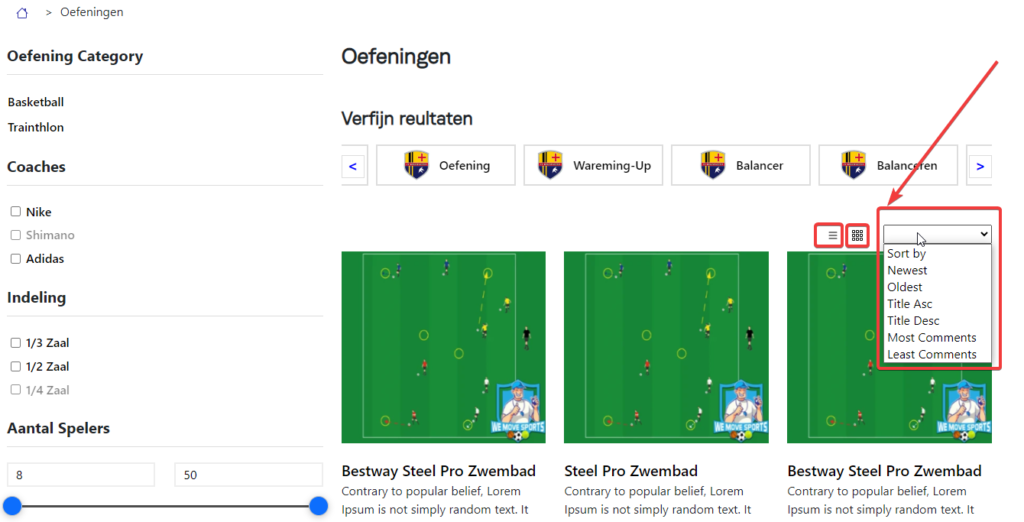
Quick answer: To add a sort posts dropdown in WordPress, place a small form with a select field above your post loop and use the pre_get_posts hook to change orderby and order based on the chosen value. The two snippets below do this safely, with no plugin, on blog, archive and search pages.
Table of Contents
How the sort posts dropdown in WordPress works
The dropdown adds a ?sort= value to the URL when a visitor picks an option. A small pre_get_posts function reads that value and changes the order of the posts WordPress loads. Because only a fixed list of values is accepted, visitors cannot inject anything into your query.
It works on the blog page, category and tag archives and search results, and it keeps the search term and category when the order changes.
Step 1: Add the dropdown form
Put this where you want the dropdown, for example above the loop in archive.php, index.php or search.php. You can also save it as sort-form.php and load it with get_template_part( 'sort-form' ).
<?php
$allowed = array(
	'date-desc'          => 'Newest first',
	'date-asc'           => 'Oldest first',
	'title-asc'          => 'Title A to Z',
	'title-desc'         => 'Title Z to A',
	'comment_count-desc' => 'Most comments',
);
$current = isset( $_GET['sort'] ) ? sanitize_text_field( wp_unslash( $_GET['sort'] ) ) : 'date-desc';
?>
<form method="get" class="sort-posts">
	<?php if ( is_search() ) : ?>
		<input type="hidden" name="s" value="<?php echo esc_attr( get_search_query() ); ?>">
	<?php endif; ?>
	<?php if ( ! empty( $_GET['cat'] ) ) : ?>
		<input type="hidden" name="cat" value="<?php echo absint( $_GET['cat'] ); ?>">
	<?php endif; ?>
	<label for="sortbox">Sort by</label>
	<select id="sortbox" name="sort" onchange="this.form.submit()">
		<?php foreach ( $allowed as $value => $label ) : ?>
			<option value="<?php echo esc_attr( $value ); ?>" <?php selected( $current, $value ); ?>>
				<?php echo esc_html( $label ); ?>
			</option>
		<?php endforeach; ?>
	</select>
	<noscript><button type="submit">Sort</button></noscript>
</form>
Step 2: Apply the order with pre_get_posts
Add this to your child theme functions.php. It uses the official pre_get_posts hook, so pagination keeps working.
/**
 * Apply the ?sort= value from the dropdown to the main query.
 */
add_action( 'pre_get_posts', function ( $query ) {
	if ( is_admin() || ! $query->is_main_query() || empty( $_GET['sort'] ) ) {
		return;
	}
	if ( ! ( $query->is_home() || $query->is_archive() || $query->is_search() ) ) {
		return;
	}
	$allowed = array( 'date-desc', 'date-asc', 'title-asc', 'title-desc', 'comment_count-desc' );
	$sort    = sanitize_text_field( wp_unslash( $_GET['sort'] ) );
	if ( ! in_array( $sort, $allowed, true ) ) {
		return;
	}
	list( $orderby, $order ) = explode( '-', $sort );
	$query->set( 'orderby', $orderby );
	$query->set( 'order', strtoupper( $order ) );
} );
Why this version is safer than the usual snippet
- Many older snippets print
$_GETvalues straight into the page, which allows cross-site scripting. Here every value is escaped or converted to a number. - Older code used
order=dsc, which WordPress ignores. The correct value isDESC. - The order is applied on the server with
pre_get_posts, so it also works with pagination and without JavaScript.
Add more sort options
To sort by an ACF or custom field, add an option such as price-asc to both lists, then in pre_get_posts set meta_key to your field and orderby to meta_value_num. I use the same idea in ordering an Elementor Loop Grid by an ACF date.
Frequently asked questions
How do I add a sort posts dropdown in WordPress without a plugin?
Add a small form with a select field that submits a sort value, then use the pre_get_posts hook in functions.php to set orderby and order on the main query. Both snippets are above.
Does the dropdown work with pagination?
Yes. The sort value stays in the URL and pre_get_posts applies it to every page of results.
Can I sort posts by a custom field?
Yes. Add a new option and set meta_key and orderby (meta_value or meta_value_num) for it inside the pre_get_posts function.
Want custom filters or sorting on your site? See my WordPress services or get a free quote.
Related guides
- Add Post type to search results filtering by ACF meta value
- Elementor Loop Grid Order By ACF Date Field
- Hire Dedicated WordPress Developers Who Actually Get Results
Need help with your own site? Get a free quote or see my recent builds.