
Quick answer: For an Elementor Loop Grid order by ACF date field, give the Loop Grid a Query ID (for example dd_event_date) and hook into elementor/query/dd_event_date to set meta_key to your field and orderby to meta_value_num. ACF saves Date Picker values as Ymd, so numeric sorting puts the soonest date first.
Table of Contents
I use this on event, course and webinar sites where the next upcoming item must always appear first. Below are the exact snippets, plus a version that hides past events and a bonus that drafts them automatically.
Step 1: Create the Loop Grid template
Design a Loop Item template in Elementor that shows your ACF fields (title, date, image, button), then add the Loop Grid widget to your page and choose that template. The Loop Grid needs Elementor Pro.
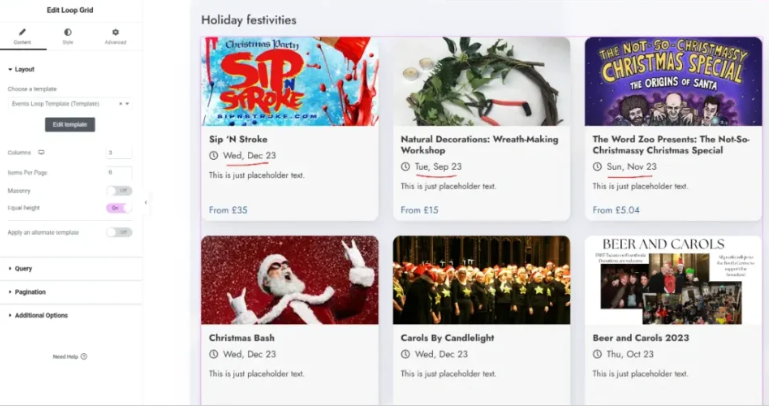
Step 2: Add a Query ID to the Loop Grid
Select the Loop Grid widget and go to Content > Query > Query ID. Enter dd_event_date. Elementor will now run your custom query hook for this widget only.
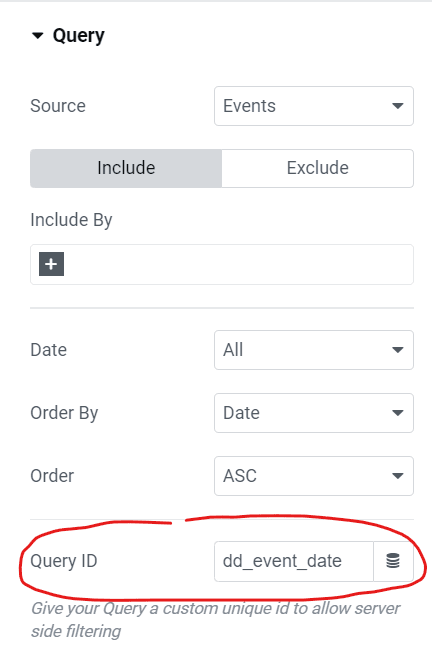
Step 3: Elementor Loop Grid order by ACF date (the PHP snippet)
Add this to your child theme functions.php or a code snippets plugin. Replace start_date with your own ACF field name. The ACF Date Picker documentation explains how the value is stored.
/**n * Elementor Loop Grid: order posts by an ACF Date Picker field (soonest first).n * Query ID in Elementor: dd_event_daten */nadd_action( 'elementor/query/dd_event_date', function ( $query ) {nt$query-u003eset( 'meta_key', 'start_date' ); // your ACF field nament$query-u003eset( 'orderby', 'meta_value_num' ); // ACF stores dates as Ymd, e.g. 20261028nt$query-u003eset( 'order', 'ASC' );n} );
The same Query ID hook also works with the Elementor Posts widget, so you can use this snippet on older pages that do not use Loop Grid yet.
Show only upcoming events
To hide events that have already happened, compare the field with today’s date. wp_date() uses your site’s time zone, so events disappear at local midnight, not UTC midnight.
/**n * Only show upcoming events: start_date is today or later.n */nadd_action( 'elementor/query/dd_event_date', function ( $query ) {nt$query-u003eset( 'meta_key', 'start_date' );nt$query-u003eset( 'orderby', 'meta_value_num' );nt$query-u003eset( 'order', 'ASC' );nt$query-u003eset( 'meta_query', array(nttarray(nttt'key' =u003e 'start_date',nttt'value' =u003e wp_date( 'Ymd' ), // today, in your site's time zonenttt'compare' =u003e 'u003e=',nttt'type' =u003e 'NUMERIC',ntt),nt) );n} );
Bonus: automatically draft past events
If you also want past events removed from archives, search and sitemaps, this runs once a day and moves them to Draft. It only touches the event post type you name.
/**n * Bonus: once a day, move past events to Draft.n * Change 'event' to your post type and 'start_date' to your ACF field.n */nadd_action( 'init', function () {ntif ( ! wp_next_scheduled( 'dd_expire_past_events' ) ) {nttwp_schedule_event( time(), 'daily', 'dd_expire_past_events' );nt}n} );nnadd_action( 'dd_expire_past_events', function () {nt$past = get_posts( array(ntt'post_type' =u003e 'event',ntt'post_status' =u003e 'publish',ntt'posts_per_page' =u003e -1,ntt'fields' =u003e 'ids',ntt'meta_query' =u003e array(ntttarray(ntttt'key' =u003e 'start_date',ntttt'value' =u003e wp_date( 'Ymd' ),ntttt'compare' =u003e 'u003c',ntttt'type' =u003e 'NUMERIC',nttt),ntt),nt) );nntforeach ( $past as $event_id ) {nttwp_update_post( array(nttt'ID' =u003e $event_id,nttt'post_status' =u003e 'draft',ntt) );nt}n} );
Common mistakes
- Using
meta_valuewith a Y-m-d string: ACF Date Picker storesYmd, so the comparison fails silently. - Reading the date with
get_field(): it returns the formatted value (for example 28/10/2026), whichstrtotime()cannot parse. Query the raw meta value instead, as above. - Wrong Query ID: the ID in Elementor must match the hook name exactly.
- Caching: if a page cache is active, clear it after midnight or exclude the events page so expired events disappear on time.
If you would rather not edit code, you can hire an Elementor developer to build your events grid, filters and custom Loop Grid layouts.
Frequently asked questions
Why is my Elementor Loop Grid not sorting by the ACF date?
The ACF Date Picker saves dates as Ymd (for example 20261028). Sort with orderby meta_value_num and compare against wp_date(‘Ymd’). Comparing against a Y-m-d string or using type DATETIME gives the wrong order.
Does this work with the ACF Date Time Picker?
The Date Time Picker saves values as Y-m-d H:i:s. Use orderby meta_value, type DATETIME and compare against wp_date(‘Y-m-d H:i:s’) instead.
Do I need Elementor Pro?
Yes. The Loop Grid widget and custom Query IDs are Elementor Pro features.
Where do I put the PHP code?
Add it to your child theme functions.php or a code snippets plugin. Do not edit a parent theme, because updates will remove your code.
Related guides
- Advanced Custom Fields All Need Code Snippet
- Elementor Open Specific Tab, Toggle or Accordion on Link click
- Hire Dedicated WordPress Developers Who Actually Get Results
Need help with your own site? Get a free quote or see my recent builds.