
Quick answer: n8n WordPress automation connects your WordPress or WooCommerce site to other apps and AI so routine jobs run on their own. The seven workflows that save small businesses the most time are new-order alerts, AI lead triage, review requests, unpaid order reminders, auto-sharing new posts, AI blog drafts for human editing, and a weekly website health report. Self-hosted n8n is free; you pay only for hosting and AI usage.
Most small business owners I build websites for lose hours every week to the same copy-and-paste jobs: forwarding new orders to the team, replying to the same enquiries, chasing unpaid orders, posting new articles on social media. None of this needs a person. With n8n and a WordPress or WooCommerce site, you can hand it to a workflow that runs day and night. Here are the seven automations I set up most often, what each one saves, and how to build it.
Table of Contents
What is n8n and why use it with WordPress?
n8n is a workflow automation tool, similar to Zapier or Make. You connect apps as boxes (nodes) on a canvas: a trigger starts the workflow, and each next node does one job. Three things make n8n a good fit for WordPress work:
- It can run on your own server. The self-hosted community edition is free, so you are not paying per task as the business grows. n8n Cloud is available if you prefer not to host it.
- It has WordPress and WooCommerce nodes. The WordPress node works with posts, pages and users, and the WooCommerce Trigger fires when orders, products, customers or coupons are created, updated or deleted.
- AI is built in. You can add an OpenAI, Gemini or other model step to read, sort or draft text inside any workflow.
Before you start: connect WordPress to n8n
Create an Application Password in WordPress (Users, Profile, Application Passwords) and use it in the n8n WordPress credential, never your normal login password. For WooCommerce, create a REST API key under WooCommerce, Settings, Advanced, REST API. For anything that has no ready-made node, send data from WordPress to an n8n Webhook node. This snippet sends every contact form lead to n8n:
// Send a lead to an n8n Webhook node (replace the URL with your own).
function tdev_send_lead_to_n8n( $lead ) {
	wp_remote_post( 'https://n8n.example.com/webhook/new-lead', array(
		'timeout'  => 5,
		'blocking' => false,
		'headers'  => array( 'Content-Type' => 'application/json' ),
		'body'     => wp_json_encode( array(
			'name'    => sanitize_text_field( $lead['name'] ),
			'email'   => sanitize_email( $lead['email'] ),
			'message' => sanitize_textarea_field( $lead['message'] ),
			'page'    => esc_url_raw( wp_get_referer() ),
		) ),
	) );
}
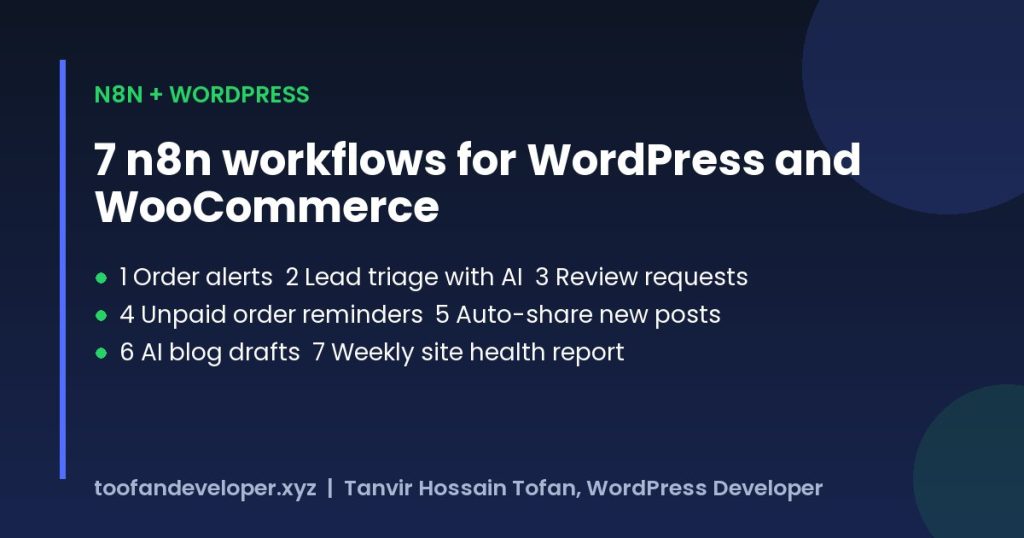
7 n8n WordPress automation workflows
1. Instant new-order alerts for the team
Flow: WooCommerce Trigger (order created) → Google Sheets (add row) → Telegram, Slack or WhatsApp message to the packing team.
Saves: checking the dashboard all day, and missed orders on busy days. Bangladeshi stores that take cash on delivery like this one, because the courier booking can start the moment the order arrives.
2. Lead triage with AI
Flow: Webhook (new contact form lead) → AI step classifies it (budget, service, urgency, spam) → hot leads go to WhatsApp or Slack immediately, the rest to a Google Sheet or CRM → Gmail sends a personal first reply drafted by AI for you to approve.
Saves: slow first replies. Replying within an hour wins far more projects than replying the next day.
3. Review requests after delivery
Flow: WooCommerce Trigger (order updated) → IF status is completed → Wait 5 days → email asking the customer for an honest Google review.
Saves: forgetting to ask. Real reviews from real customers are one of the strongest local SEO signals, and this keeps them coming steadily.
4. Unpaid and pending order reminders
Flow: Schedule Trigger (every morning) → WooCommerce node (get orders with status pending or on-hold) → email or SMS reminder with the payment link → after 3 days, a message to you to follow up by phone.
Saves: lost sales from customers who meant to pay but got distracted.
5. Auto-share new blog posts
Flow: RSS Feed Trigger on your site feed → AI step writes a short LinkedIn and Facebook caption from the title and excerpt → posts to your pages, or sends the captions to you for approval.
Saves: 20 to 30 minutes per post, and you never forget to share.
6. AI blog drafts, human final edit
Flow: Google Sheet of topics and keywords → AI step drafts an outline and first draft → WordPress node creates a draft post (never published automatically) → notification to the editor.
Saves: the blank-page hours. Keep a person in the loop: Google ranks helpful content written from real experience, so add your own examples, numbers and screenshots before publishing.
7. Weekly website health report
Flow: Schedule Trigger (Monday 9 am) → HTTP Request to the PageSpeed Insights API and an uptime check → AI step summarises the numbers in plain language → email to the owner.
Saves: finding out the site was slow or down only after customers complain. Pair it with my WordPress maintenance checklist.
n8n vs Zapier vs Make for WordPress
| n8n | Zapier | Make | |
|---|---|---|---|
| Hosting | Self-host free or n8n Cloud | Cloud only | Cloud only |
| Pricing model | Per workflow execution (cloud) or free self-hosted | Per task | Per operation |
| WordPress and WooCommerce | Built-in nodes + webhooks | Built-in apps | Built-in apps |
| Custom code | JavaScript and Python nodes | Limited | Limited |
| Best for | Many workflows, growing volume, data control | Quick simple zaps | Visual multi-step scenarios |
For a small business with a handful of simple automations, any of the three works. Once you have many workflows or high order volume, self-hosted n8n usually costs far less. Check each tool’s current pricing page before you decide.
Mistakes to avoid
- Publishing AI-written posts automatically. Always create drafts and edit them.
- Using your admin password in n8n. Use Application Passwords and API keys with the least access needed.
- No error handling. Add an Error Trigger workflow that messages you when a workflow fails.
- Sending customer data to AI tools without saying so in your privacy policy.
- Automating a messy process. Fix the process on paper first, then automate it.
How much does WordPress automation cost?
Self-hosted n8n itself is free; you pay for a small server and any AI usage, which for most small businesses is a few dollars a month. Setting up the first three to five workflows is usually a one to three day job. I build these for WordPress and WooCommerce sites as part of my WordPress development services. If your site also needs an AI assistant for visitors, my free Talkvara AI Chatbot plugin answers from your own content and captures leads. If you want AI that can also take actions inside your admin, read my guide to an AI agent for WordPress.
Frequently asked questions
Is n8n free to use with WordPress?
The self-hosted community edition of n8n is free. You pay for the server it runs on and for any AI or SMS services you connect. n8n Cloud is a paid hosted option.
Does n8n have a WordPress trigger?
n8n has a WordPress node for posts, pages and users, and a WooCommerce Trigger for orders, products, customers and coupons. For other WordPress events, send data to an n8n Webhook node from your site, or use the RSS Feed Trigger for new posts.
Can n8n publish blog posts to WordPress automatically?
Yes, but I recommend creating drafts only. Edit and add your own experience before publishing, because automatically published AI content rarely ranks and can hurt your site.
Is n8n better than Zapier for WordPress?
For a few simple automations, Zapier is quicker to set up. For many workflows, custom logic or high order volume, n8n is usually cheaper and more flexible, especially self-hosted.
Can you set up n8n automation for my WordPress site?
Yes. Tell me which tasks take your team the most time, and I will suggest the workflows and give you a fixed quote.
Want these workflows on your site? Tell me the three tasks that eat most of your week and I will map the automations for free, or message me on WhatsApp.